ℹ️ This skill removes the telltale signs of AI writing from any text: the em dashes, the “it’s not X, it’s Y” lines, the words like “delve” and “tapestry” that give it away. It’s built from Wikipedia’s Signs of AI Writing guide, the same checklist Wikipedia editors use to clean AI text out of their own articles. It checks your writing against 33 known patterns and rewrites it so it reads like a person wrote it.
What you need
- A Claude account (custom skill uploads are available on paid plans such as Pro and up)
- About 3 minutes
No coding required. The skill is a single text file that you upload once, and then it works in every chat.
Step 1: Download the skill file
Grab the skill.md file here: 👉 Google Drive link

Step 2: Upload it to Claude
- Open Claude (claude.ai or the desktop app)
- Open/extend the left sidebar
- Go to Customize → Skills → Add → “Upload a skill”
- Select the
.mdfile you downloaded in Step 1
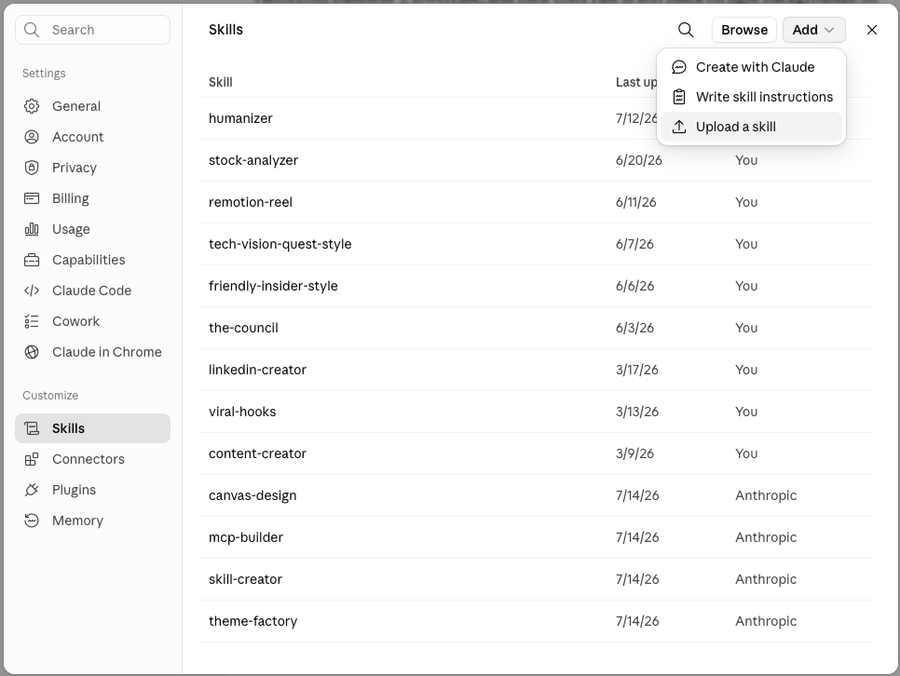
That’s it. The skill is now installed and will stay available in every new chat.
Step 3: Use it
Open a new chat and type:
/humanizerThen write or paste the text you want to clean up. Claude will scan it against all 33 AI writing patterns and hand back a rewritten version.
You can also just ask in plain English. Things like “humanize this” or “make this sound less like AI” followed by your text will trigger the skill automatically.
💡 Get it to sound like YOU, not just “human”: paste 2 or 3 paragraphs of your own genuine writing along with the text you want rewritten, and say “match my voice.” The skill uses your sample to calibrate tone, rhythm, and word choice.
What it actually fixes
A few examples of what gets caught and rewritten:
- Em dashes everywhere. The single most reliable AI tell. The skill removes every one.
- “It’s not just X, it’s Y.” The negative parallelism formula that AI loves.
- AI vocabulary. Words like delve, crucial, tapestry, showcase, testament, vibrant, landscape.
- Rule of three. AI forces everything into groups of three (“innovation, inspiration, and insights”).
- Fake-deep endings. “The future looks bright as they continue their journey toward excellence.”
- Staccato drama. Short. Punchy. Fragments. Stacked for effect when a normal sentence would do.
Troubleshooting
- Skill appears greyed out? Code execution is turned off. Go back to Settings → Capabilities and enable it.
- Skill doesn’t trigger? Call it directly by typing
/humanizerat the start of your message.
Credit
The skill is the open-source blader/humanizer project on GitHub (28,000+ stars), released under the MIT license, and it’s based on Wikipedia’s Signs of AI Writing guide.