🎯 What you’ll build: an AI character trained on your own face, so you can recreate any Pinterest photo (magazine covers, editorial shoots, street style) starring you. No Photoshop, no photographer. You just chat with Claude.
What you need
- Claude (claude.ai or the desktop app, on a paid plan)
- A Higgsfield account with a subscription, training your character needs credits, and a plan unlocks them
- 15–20 clear photos of yourself
- About 10 minutes, one time. After setup, each new photo takes about a minute.
Step 1: Connect Higgsfield to Claude
Higgsfield is the AI image tool that actually generates the photos. Claude is the brain that drives it. They talk through something called a connector (MCP). Sounds technical, but it’s two clicks:
- Go to claude.ai → Settings → Connectors
- Select Add Custom Connector, paste in the URL shown below, then hit Connect
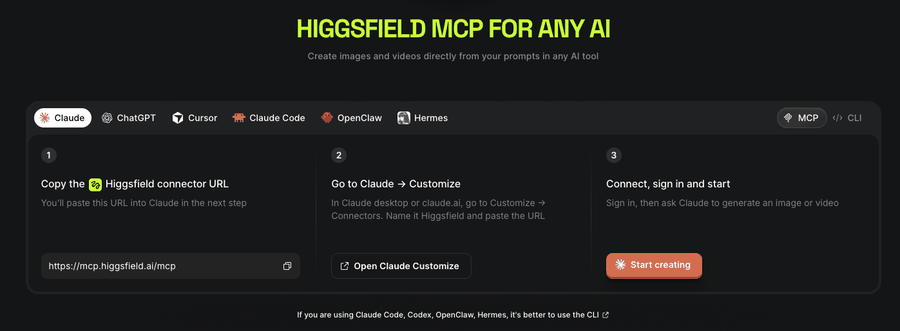
- Sign in to your Higgsfield account when it asks
That’s it. Claude can now generate images, check your credits, and train characters for you. You never have to open the Higgsfield website.
Step 2: Make a folder with your photos
Create a folder (mine is just on my Desktop, called “Michael Photos”) and drop in 15–20 photos of yourself:
- ✅ Sharp, well-lit, mostly head-and-shoulders
- ✅ Different angles, outfits, and lighting (indoor + outdoor is great)
- ✅ A few waist-up or full-body shots if you ever want wider scenes
- ❌ No sunglasses, heavy filters, group shots, or blurry pics
You don’t need to crop or edit anything. Claude will prep the photos for you. It auto-detects your face and crops every photo to the ideal training format.
Step 3: Train your character (about 10 min)
In Claude, say:
Here's a folder of my photos: [path or drag the folder in].
Prep them and train a Higgsfield character of me using Soul 2.0.
Claude crops the photos, uploads them, and kicks off training. Ten minutes later you have a reusable Soul character: your digital twin.
⚠️ If training fails with a vague “Something went wrong,” that’s almost always out of credits, not a real error. Ask Claude to check your balance.
Step 4: Lock in your “benchmark face”
This is the step most people skip, and it’s the difference between “kinda looks like me” and “wait, when did I do this shoot?”
- Ask Claude to generate 3–4 test portraits of your character
- Pick the one that looks most like you
- Tell Claude: “Keep my face and hair as close to this image as possible in everything we generate.”
Claude will memorize the exact features (hair shape, brows, jawline, skin texture) and bake them into every future prompt.
Step 5: Go hunting on Pinterest
Find 1–3 reference photos you’d love to exist in. Searches that work really well:
men's editorial magazine portraitkorean magazine photoshootstreet style portraitold money outfit photoshootstudio portrait glasses
Save the pins, then just paste the images into Claude.
Step 6: The magic prompt
With your references pasted in, say:
Recreate these images using my Soul character.That’s genuinely it. Claude describes each scene in detail (outfit, pose, lighting, background, even magazine text), swaps in your locked-in face, and generates a couple of variants of each so you can pick the winner.
What a good prompt looks like under the hood
If you want to write or tweak prompts yourself, this is the formula Claude uses:
[scene + pose] + [outfit details] + [your face/hair description] + [lighting] + [realism words]
Real example from my FLNK magazine-cover recreation:
Korean fashion magazine studio portrait. A young man seated on a low stool
leaning forward toward camera, forearms resting on his knees, hands loosely
crossed at the wrists showing a chunky silver chain bracelet. He wears an
oversized crisp white button-up shirt and a slim black tie. Full black hair
with a soft fringe showing individual strands, straight dark brows, narrow
jaw. Cool gray-blue studio backdrop, diffused lighting, subtle film grain,
natural uneven skin tone, no beauty retouching.
Realism cheat sheet
| Words that make it look REAL | Words that make it look CGI |
|---|---|
| natural uneven skin tone | flawless skin |
| subtle film grain / sensor noise | ultra sharp, 8K |
| flyaway hairs, soft fringe strands | perfect hair |
| faint under-eye shadows | beauty lighting |
| no beauty retouching | editorial, 85mm lens, bokeh |
Troubleshooting
- Face drifts in wide/full-body shots → your training photos were all close-ups. Add a few waist-up and full-body photos and retrain.
- Vague “Something went wrong” → check your credit balance first. That’s what running out looks like.
- Tempted to upload the Pinterest photo as a “reference image” in Higgsfield? Don’t. That slot copies the photo instead of building your scene, and your prompt gets thrown away. Let Claude describe the reference in words instead. That’s the whole trick.
- Results too glossy? Add more realism words from the cheat sheet and regenerate. Images are cheap, so always make 2–4 variants and pick.